Lock the fix area of the Dock.
|
Setting recent application number, default is 3.
|
Setting macOS lauchpad columns and rows
|
More modern macOS can not stop upgrade from setting, but still can clean the red dot.
Adjust menu area
|
From reddit
|
|
|
|
More modern macOS can not stop upgrade from setting, but still can clean the red dot.
|
From reddit
|
The target server has the Rocky Linux installed and running the homeland forum already. I already downgrade the node.js from 18 to 16 to meet the open project needs.
|
|
Ruby 3.2 need Rust to build JIT.
|
|
|
|
Run in the release rails root folder
|
|
|
|
When start developing open project, I found it only support Node.js 16 and confirm Node.js 18 not working currently, so I need downgrade the node version in a Rocky Linux server to build a staging environment and here is how:
|
|
现代软件是人类合作的结晶,以homeland这个以Rails开发的小型论坛为例,Ruby 语言的依赖项有211项,Javascript 依赖项目更是达到了1811项,这无疑会遇到应用依赖的组件管理困难。例如,组件的许可证变动引发巨量修改,JS 组件中发生故意投毒事件,所以很多真正非常非常关心软件正确性的公司,基本的软件组件采用策略是 0 依赖。例如 37 signals,基本他们从来不用不是自己开发的组件(其他人会依赖他们组件,他们从来不依赖别人的组件);Google 的 Go 语言也自带了从机器码汇编器,做到了编译过程的 0 依赖,同时编译出来的 Go 程序只依赖于自身和libc库,基本也做到了 0 依赖;苹果公司的每一个新版本的 macOS,越做越小,依赖越来越少,最新的版本 perl python ruby 这些脚步语言也不再随操作系统发行。
这些组件依赖的管理方法才是提高软件质量的根本途径,但这样做的开发成本太高,代价过大,并不适合绝大多数的中小型企业。中小型企业往往会选择了一种类似市集开发的模式,尽可能的利用已有的组件,而不管这些组件是哪家公司的,只要协议上允许,无需付费,基本上管理层会同意任何组件的使用。(稍大一点的公司会有一个引入的评审,但国内不多见。)
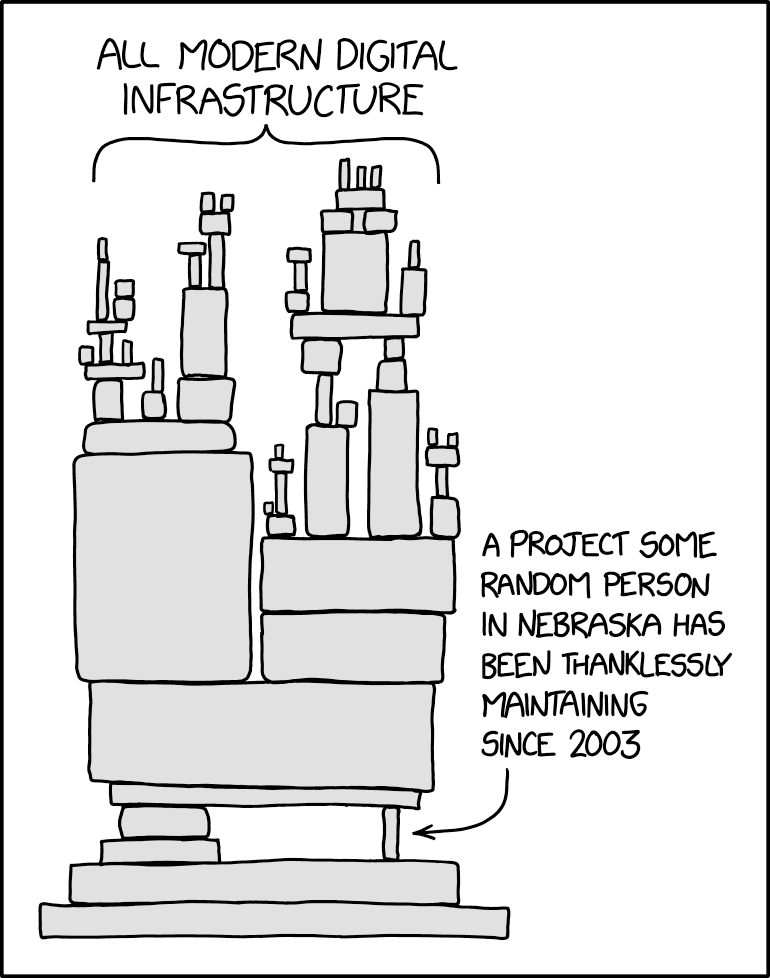
这基本构成了现代的软件体系,一个有很多薄弱层的高楼。
如果巨量的依赖性不可避免,那么依赖的管理就必须重视,Gitlab已经将依赖扫描作为基本功能提供,Github也会定期扫描托管的代码库,及时报告有漏洞的组件版本给开发者,而开发者基本上可以有三种策略来管理依赖。
也就是从来不更改任何本软件系统的依赖项。这些依赖项在开发初期啥样,开发完毕也是啥样,上线后还是一样,10年以后还是完全一样的这些依赖项。现代依赖管理工具是支持重复安装锁定的依赖项的,所以重装机器,新的开发人员都可以对齐到最初的依赖项版本。
这个策略的优势是成本极小,引入组件依赖的Bug的概率为 0(当然无法避免自己写出 Bug 或者一开始的依赖项就有 Bug 的情况)。
但这个策略的劣势很多,比如即使从来不升级,还是无法保证应用运行的服务器物理上不损坏,VMware不升级,服务器的操作系统openssl版本不变动。这些变动往往在锁定依赖的软件系统上表现为无法在新硬件,新操作系统运行,从而导致这些应用最终只能安装在一个特定版本的操作系统上。
以 10 年的尺度来看,永不升级的项目基本就是死的,因为 10 年后的开发者是无法复现 10 年前的环境的,微软的系统这点上要远好于 Linux ,当然兼容性永远以稳定性为代价,众多的互联网公司实际还是使用 Linux ,其实已经做出了稳定性优先于兼容性的选择,那么永不升级的策略也只能在 Linux 上有 10 年左右的寿命。10 年以后即使系统还能跑,但是企业将非常非常难以找到懂 10 年前的技术的开发者。年轻的开发者一般 25 岁入行,35 岁跑路,除非企业愿意在 35 岁跑快递的那些不思进取的开发中寻找雇员,否则将非常难以找到维护人员。那些紧跟技术潮流的资深开发或者新人也基本上不愿意学习 10 年前的技术和依赖,所以,永不升级在商业上就不是一个合理的策略。
另外一个绕不开的问题是,在任何一个时间点开始的项目,他们的依赖在随后的岁月中必然会发现很多安全漏洞,由于永不升级策略,这些安全漏洞不可能被弥补,所以除非企业的应用完全不考虑安全性,否则永不升级策略客观上也是完全不可行的。
周期性升级策略是一个折中的策略,每年或者每个季度升级一下,升级到最新的组件依赖项,并且一般会升级很多依赖项,是周期的长短而定,开发团队需要去解决这些依赖项的冲突或者Bug或者适配新功能,周期性升级策略一般伴随着大版本的更新,也必须走UAT用户确认测试流程,这些开发工作量都不小,很可能由于软件开发项项目压力而延期。一旦延期就将积累更巨量的依赖项更新,延期只会导致适配工作量的继续增加,基本上这是一种技术债。
以笔者经验,周期性升级的痛苦值是最大的,最后开发团队都会选择两条道路:
永远最新策略很简单,就是保持一个项目的所有依赖项都是最新的,一旦那个组件出了新版本,立刻升级上去,然后经过简单的冒烟测试(能跑起来就行)或者较为完整的CI(持续集成测试,会自动测试软件的一些基本功能),直接发到生产开始跑。
这个策略听起来十分的暴力,项目的依赖项没有经过测试就直接上了生产,但是其实结果并没有看上去那么可怕。原因有很多:
永远最新策略的优势就是克服了永不升级的问题,项目永远是活的,可以在任何正常的Linux下安装,可以使用任何主流的工具,永远能找到年轻的开发者。
当然永远最新也没有任何安全漏洞,毕竟一旦有安全漏洞,这些依赖的组件必然会发版本,然后应用就用上了。
永远最新由于一次只升级一个组件,理论上的改动是最小的,相比周期升级,一次升级的工作量也是最小的。
唯一的劣势可能就是必须有开发维护人员永远维护,像心跳一样不能停,一旦停就开始累积依赖更新,很快就会变成周期更新或者永不更新。
最近软件供应链这个词也在公开的面向企业管理者的媒体中频频出现,比如国内的再谈“开源软件供应链安全” 但实际上,开源软件没有供应链的概念,各个中小企业没有给任何它们依赖的组件付费,而供应链的本质,是企业依赖了其他人的组件,并因此付费。
所以在缺乏付费支持的情况下,软件组件并不是以一个供应链的机制在运行,虽然软件系统的确类似于硬件产品,依赖了众多的组件,但组件开发者和使用者之间,是不存在类似供应商的关系的,但不可否认的是组件开发者和使用者之间的确存在紧密的联系,笔者更愿意概括为:开源软件的责任。
笔者认为开源软件的目的实际上是节约成本:
所以开源软件作者和用户虽然没有法律意义上的相互责任,但是却有隐含的责任条款:
开源作者必须提供容易追溯审查的源代码,尊重使用者的兼容性要求,在满足绝大多数用户的前提下,提供安全无bug的新版本。
开源使用者也有责任有义务紧跟开源作者发布的新版本,因为作者刚写完脑子里面对新改动是最有印象的,如果使用者能够及时使用到生产/开发中,实际上是在帮助开发者测试。
开源软件使用者在长时间的使用某个开源组件后,也客观上能够成为新的开源组件维护者,人都是要死的,用户量庞大的开源组件却是永生的,维护者最大的心愿也是能够找到下一任维护者,让开源软件一直有维护,大家一直能使用。从这点看,开源软件开发方式实际上是一种来自未来共产主义的模式,更加需要各个参与方的自觉自我激励。
Rails有异常多的安全实践,开源组件的安全性可以非常高,以Rails源码为例,任何一次递交,至少有1000个资深开发会扫一眼更改的代码。Rails也有专门的安全邮箱用来报告漏洞(不公开),直到发布完毕补丁版本后这些修补才会公开。
安全性的前提就是使用最新版本的组件,因为只有最新版本的组件才是没有任何已知问题/安全漏洞的。
所以软件系统的依赖管理策略其实只有一种,就是永远保持最新,这既是社区的要求,也是安全的要求,同时也是项目自身活力和吸引新的开发者/雇员的要求,当然大型的软件系统都是周期发版本的,所以也可以认为是一种周期更新,但是这种周期更新还是应该尽量的短,毕竟当只改了一个组件的依赖版本,而系统挂了,那肯定就是那个组件的问题,不用排查,而如果同时改了10个依赖的版本,那就没那么容易判断了。
Ruby 3.2 introduce JIT which need Rust compiler, it also need higher version of GCC, I choose install pre-build Rust Toolset 7
|
Enable Rust and new C++:
|
Create new user largly following 2019 posts
|
|
|
|
Please notice below method is outdated and ruby core team confirm it's a bug
一天,蜗牛和蚕宝宝在窗台上偶然相遇了,蚕宝宝问蜗牛,“你是谁?为啥你的身上有个难看的壳?“蜗牛愤怒的说:”那是我的家,我累了倦了可以休息的地方,你又是谁?不会连住的地方也没有吧?“蚕宝宝想了想,好像自己吃了那么多桑叶,长了这么大,从来也没想过要在哪里住这个问题。不过既然蜗牛那么说,好像住的地方也挺重要的,那就不妨……
”我住在仙人掌的顶上,看到没?不比你的房子漂亮?!“
蜗牛顿时有点傻眼,有点不相信,但是又说不出哪里有问题:“好宝宝,能不能带我上去看看?我看这颗仙人掌好高啊!”,蚕宝宝有点紧张,自己好像也没爬过那么高大的仙人掌,不过既然大话已经说出去了,也只能……
“那我带你,你跟我来!”蚕宝宝在蜗牛之前,就开始爬起了仙人掌,蜗牛则紧跟在后,蚕宝宝当然不熟路,爬到一半一不注意一头撞上了仙人掌的一根刺,顿时头疼浑身一卷滚下了仙人掌。蜗牛也没好到哪里,由于他不愿意放弃他的壳,完全就跟不上蚕宝宝,不过好在他及时的接住了滚下来的蚕宝宝。
蚕宝宝很感激蜗牛的救命之恩,有点不好意思的说,“蜗牛哥,我说谎了,其实我也没住的地方,平时我都是吃桑叶吃累了,随便就地睡觉的。”蜗牛也有点惭愧,说:“好宝宝,我背了一个大壳,其实限制了我的行动力,我其实刚刚压根就爬不了仙人掌。”
蚕宝宝突然发现自己太虚荣了,蜗牛哥还是很可爱的,于是两个人最终成了很好的朋友。
|
List all table size. origin
|
table optimization and analyzing for all databases.
Add the official beta apt source
|
Do install && restart
|
