Original from reddit
Go to chrome://flags/ and look for "Default Browser Prompt Refresh" and set that to Disabled. I believe that will turn that off.
Original from reddit
Go to chrome://flags/ and look for "Default Browser Prompt Refresh" and set that to Disabled. I believe that will turn that off.
今年的公司读书会的第二本书,我是从头翻到尾的读了一遍了,读完才发现被骗了,这书的中文标题就是错的:“流程圣经:让流程自动管理绩效”,我是读到最后一页才意识到被骗了,因为最后一个章节是“译后记”,译者总算在最后良心发现,提了一嘴我一直没主要到的细节,这书的英语名字是“Improving Performance: How to manage the white space on the organization chart”,这书出版于 2014 年,那时候还没 AI 和 GPT,不过我似乎已经找到了 2024 年的 AI/GPT 弱智根源,看着这英语书名,能翻译成“流程圣经:让流程自动管理绩效”,怎么说呢,完全突破了我的想象力,让我大受震撼!
本来我打算看完一遍就开始写书评了,但是看到最后一页这个英语书名和中文书名,让我有了很大的去读原文的冲动,毕竟,如果全书的翻译水准和书名的翻译一样水准的话,我就算再看一遍这本中文版的流程圣经,又有何意义呢?等等,圣经!译者想暗示这英语版就是骗人的吗?我不禁又一次陷入了沉思…
但我手头也没有英文版,但是我只能小心翼翼的,仔细读了译后记,果然发现了更多的问题,这书号称从 250 个成功实施的项目中总结而来,历经惠普,3M,壳牌石油和花旗银行等一众 500 强企业,具有实操性,所以,这就是这 10 年来,惠普蟑螂门,3M 沦落到 PDD 卖胶水,花旗银行,我一个好友供职的公司对华银行业务全关的真相?译后记还提到了“最系统,最科学,最完整”的流程方法论,嗯,可能 2014 年新的广告法还没有实施?译者知道这样写最,最,最,现在连拼多多的垃圾货也不会用这样的广告词啊!
吐槽结束,让我们在仔细看看这本书,第一章作者提出了一个很好的问题,就是直接画出类似苹果的组织图的企业是危险的,因为没有显示企业为客户提供价值的流程,从研发到生产到销售的过程。
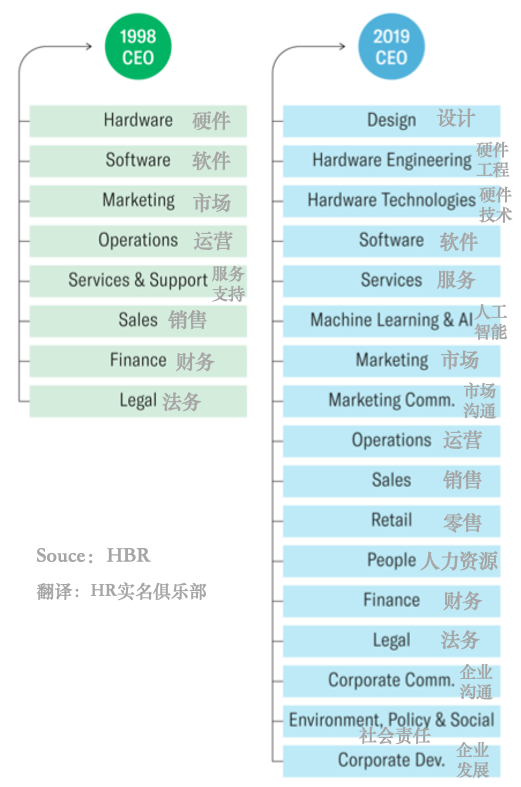
嗯,我们姑且不论苹果是不是近年来最成功的公司,先看一下作者提到的几个核心主流程(第 50 页,流程层绩效):
坦白说,我认为,无论你如何设计流程,前面 5 个主流程都是困难的,而且是各个企业不同的,甚至这根本不是流程的问题。
我疑惑了,我又一次读了“译者导读”:“这套方法论能切切实实的为为数众多的中国企业带来绩效回报,尤其在劳动力缺乏,劳动力成本升高的今天,对企业压缩成本,提升效率,改进绩效的实践活动有着立竿见影的帮助”,我悟了,这书的前提有问题,错把结果当原因,绩效只是一个系统运行后的评价结果指标,流程是不可能自动管理绩效的,最多最多就是节省点思考时间,节省点人力,节省人力是有用的,节省思考时间是危险的,不可能把业务开发这样的高难度高灵活性高优先级的活动流程化,还是要靠人,最多最多,企业的这样的流程不造成阻碍作用,能帮助业务开发人员节省点时间就上上大吉了。
我其实重点是想做绩效,这个的确是流程的衍生,因为绩效总是想做的更客观一些,尽量排除主观的因素,读了第12章,绩效测评与管理体系设计,第250页,写到:“展示了绩效管理的3大构件,以岗位层为例:步骤1,为每个岗位设定产出和绩效期望值(目标设定)。”,是的直接跳到了步骤二,我不知道其他读者看了啥心情,我又仔细翻了前后,这本书最大的问题是在不该省略的地方惜字如金,在可以省略的地方给你大段的表格和流程图。本质上,我觉得这个书可能更接近于一本随着作者给美国企业培训流程设计,发给学员的教科书,还是2000年教改以后减负的版本。
我又稍微看了一下这本书的续篇,《流程圣经》的续篇:流程绩效实战,英语title是:“Serious Performance Consulting: According to Rummler”(Rummler是这两本书作者),我觉得这本就写的比较好,因为它提出了绩效设计的垂直职位的绩效矛盾和水平协作问题,而且表格也终于少下来了。图还是一样多。
总的来看,流程和绩效系统想设计的好,绩效的指标,期望值,或者说目标设定,还有指标之间的比例真的是艺术,缺了哪点都不行,而且似乎永远你能看到矛盾点,比如强调成单率比如影响回款率,因为销售倾向于无论啥单子都做,最后往往回不了款。
无论如何有书总比没书好,设计系统的时候有个checklist也好,不过我觉得我们设计现在的绩效系统,或者其他的,往往都是陷入于细节中,总体设计的时间,已经不能说是偏少的,简直就是没有…
gdu is a very useful disk usage analyzer in console, except directly install, under Rocky Linux 9, below installation method feels more native:
|
Another brand new Ubuntu 22.04 server and another installation log.
|
|
Using nodesource distribution
|
|
|
|
|
|
|
|
|
|
|
|
The puma file which will lauch puma via system service.
|
Like the before 2022 / 2023 year, here is my current subscription, the first number is RMB per month.
So totally 480 RMB per month have to pay, in previous year is 419 RMB, so 14% higher compare with year 2023.
其实这本书可以吐槽的地方非常多,看了几页后,我就有了两个槽点:为啥书名是《华为管理变革》,而不是《华为变革》呢?看书的目录,国际化,研发,供应链,财经,组织,人力各个方面都说到了,为啥要单单强调管理变革呢?还有全书真正和华为密切相关的内容实在不多,绝大多数的内容,将华为改成小米也一样成立,那么这本书的独特性在哪里呢?抱着这两个疑问,又因为这本是直属领导要求的读书会交流书目,我开始了精读。
年轻的时候,觉得一本书最重要的是内容,常常跳过序,现在年纪大了,觉得序和作者是最重要的,序代表的写作的出发点,作者的背景决定了书的方向和内容,《华为管理变革》的第一作者是吴晓波,第二作者是Johann Peter Murmann,成书于 2017 年,是一个国际化合作和充满希望的年代。
本书有两个序,序 2 更值得一读,提到了中澳合作,最优秀的中国企业融入全球化,还有根本的原因,恐惧。序 2 也回答了本文一开始的疑问,因为是管理学院的人书写的,所以必须加上管理两个字。
概述的作者是老外,所以更精读一下,也不知道这 36 页到底给了老外多少钱,华为以客户为第一,通用电器为股东利益为第一次,西南航空以员工满意为第一优先目标,从 2024 年的角度看,这三者显然都不太成功。文中还提到了华为基本法,但是华为基本法从 1998 年后就没有发布过更新版本。任也从曾经的削足适履学习 IBM 到不再遵循基本法,可见华为管理变革的目标就是变革,华为本身是没有目标的,如果活下去不能算作目标的话。
这一章最大的看点还是2007年到2005年任的地位的空前提高,这显然离不开 IPD,让我想起了任的学习毛泽东思想的标兵身份,可见一个组织内的权利收拢必须有外部威胁,也需要内部流程变革,如果是收拢权利的话,这个案例真的值得学习,可惜只能从字里行间读,实在是不直白。
华为主要分三个阶段:
时间关系,就看了两章,总的结论就是华为是一个挺典型的国内企业案例,啥都想做,也没啥目标,后面的国际化全球化其实还是卖货,估计西班牙用了华为很多产品,所以必须建立一个研究中心,总之这些套路也是微软玩下来的,大家都差不多。
一句话总结全文就是,既要还要也要,唯一不变的就是变化,能赚到钱就能请管理学院的人写书,实打实的表示羡慕。
Although dify recommends using Docker, I found that Docker consumes hundreds of gigabytes of storage and makes it difficult to tweak the code on the fly. That's why I decided to install dify.ai from source code.
|
|
|
Or see official document.
Follow the official guide
|
|
|
|
|
following guide
|
reason to choose passenger instead of dify original gunicorn is much user friendly to change something.
|
This configuration sets up HTTP to redirect to HTTPS and configures Passenger for a WSGI application.
|
|
|
|
|
|
|
|
|
|
|
Replace cmd/commandline/version.go and main.go:43 with version
|
|
|
Only after change python part.
|
|
|
|
I'm using an brand new Rocky Linux 9 server, to deploy the pgac_demo project.
|
If htop not found
|
|
|
|
|
|
|
The puma file which will lauch puma via system service.
|
The systemd service file.
|
The nginx conf files.
|
Large following the AnyCable deployment document
|
The anycable-go can download from release page
|
You may need to fix access control for user pgac for letsencrypt key files.
|
|
Rails' default package manager for JS is yarn, and I like yarn because the package installation process on the China network is much more stable, and Capistrano's support for yarn is also great.
However, Angular projects usually use npm as the default project manager. I used to believe it's not changeable because every time I tried to switch, I failed. But yesterday, I found the correct way to do it, and here is how.
Make sure the Angular project works normally in npm.
|
This can be done via the import feature
|
This is required to ensure Angular works after the yarn import. syncyarnlock is a tool that syncs yarn.lock versions into an existing package.json file.
|
After running yarn update, compare the yarn.lock file, add missing dependencies and devDependencies after the yarn update. I guess this is the key step to migrate from npm to yarn because npm dependencies are nested but yarn's are flat.
|
|
You can keep package-lock.json or delete it, but your Angular project works with yarn now!